vidIQ AI Script Generator Review: When to Use a Free Alternative
A focused look at vidIQ's YouTube writing feature, its practical fit, and the simpler workflow to use when you only need a draft.


Searching for a vidIQ AI Script Generator review usually means you are deciding between two different jobs: planning a YouTube channel and drafting the words for one video. vidIQ presents its AI Script Writer as a YouTube-focused feature for developing hooks, outlines, talking points, pacing, and script revisions. That can be useful when your writing starts inside a broader creator workflow.
If you already have a topic and only want a quick script draft, a focused generator may be easier to evaluate. This guide separates the official product description from editorial fit advice, avoids unverified performance or pricing claims, and gives you a repeatable way to compare outputs. It covers script writing only; it does not treat a script tool as transcription software or a video generator.
Quick answer
vidIQ's AI Script Writer is worth considering when you want script help alongside YouTube-oriented research and channel tasks. The official feature page describes hooks, pacing, outlines, talking points, tone changes, keyword additions, and shorter sections. The page's call to action requires a free signup, so it is not a no-account writing flow.
When you only need a draft from a topic and brief, use a standalone writer and spend the saved setup time reviewing facts and voice. Start with the same brief in each tool and compare the opening, structure, and editing you still need. Try the YouTube Script Generator
What the vidIQ AI Script Generator is for
The feature is easiest to judge when you keep its scope clear. vidIQ's official page describes a YouTube script-writing workflow; it does not prove that every generated script is accurate, original, or ready to publish.
YouTube-first structure
The public feature page emphasizes hooks, pacing, outlines, talking points, and calls to action. Those parts can help turn a video idea into a sequence, but the creator still has to confirm that the sequence answers the viewer's question.
Revision controls
vidIQ describes changing tone, adding keywords, and shortening sections. These are useful editing directions when they make the draft clearer. They should not be used to force phrases into spoken lines or make claims the video cannot support.
Channel workflow
The writing feature sits within a product known for YouTube creator tools. That wider setting may suit creators who already use the platform for other tasks. It adds less value when your only need is to turn one topic into a first draft.
Account and access
The checked product page ends with a free-signup call to action. Feature access and usage conditions can change, so confirm them in the current account before planning a recurring workflow or comparing paid options.
Draft quality is your test
Marketing language cannot tell you whether an output sounds like your channel. Test the same short brief, then check whether the hook is specific, the claims are verifiable, and the transitions are easy to say aloud.
No automatic performance promise
A script can support a clear video, but it cannot guarantee views, retention, subscribers, or ranking. Audience fit, evidence, delivery, editing, and the video itself all affect what happens after publication.
vidIQ vs. a focused script-writing alternative
The comparison below is about workflow fit, not a claim that one model writes better. The vidIQ column reflects its public product description. The alternative column describes a writing-first task with no need to connect the draft to channel analytics.
| Option | Best for | Useful strength | Tradeoff | Details |
|---|---|---|---|---|
| vidIQ AI Script Writer | Creators who want YouTube writing inside a wider channel workflow | The official page describes hooks, pacing, outlines, talking points, and revision directions | Requires signup; current access and limits should be checked in the product | Official feature page |
| ScriptGenerator.org | A quick topic-to-script draft without an account | A focused writing path keeps attention on the brief, structure, and spoken copy | It does not know your channel history, audience analytics, or unpublished research | YouTube Script Generator |
| A general AI assistant | Open-ended brainstorming and iterative rewrites | You can add examples, notes, and voice rules through a conversation | You need to provide context and verify every factual detail yourself | Example assistant |
A fair test holds the topic, target viewer, duration, and evidence constant. Do not compare one tool's polished final revision with another tool's first response. If a feature, plan, or sign-up condition matters to your decision, confirm it on the official product page on the day you use it.
Which workflow fits your next video?
Choose based on the next decision you need to make. A script generator is one part of production, so a useful recommendation should state what it does not replace.
| Your situation | What matters first | A sensible starting point | Check the result |
|---|---|---|---|
| You are still choosing a topic | Research and audience fit | A broader YouTube research workflow such as vidIQ may be more relevant | Can you explain why this audience needs the video? |
| You know the topic and need a first draft | A clear hook and recordable structure | Test vidIQ against a standalone script generator | Which draft needs less structural repair? |
| You already have channel notes | Keep examples and voice intact | Use the tool that accepts your brief and lets you revise it | Are your examples still present in the output? |
| You need a final factual review | Evidence, accuracy, and disclosure | Keep a human editor responsible regardless of tool | Can each claim be sourced or demonstrated? |
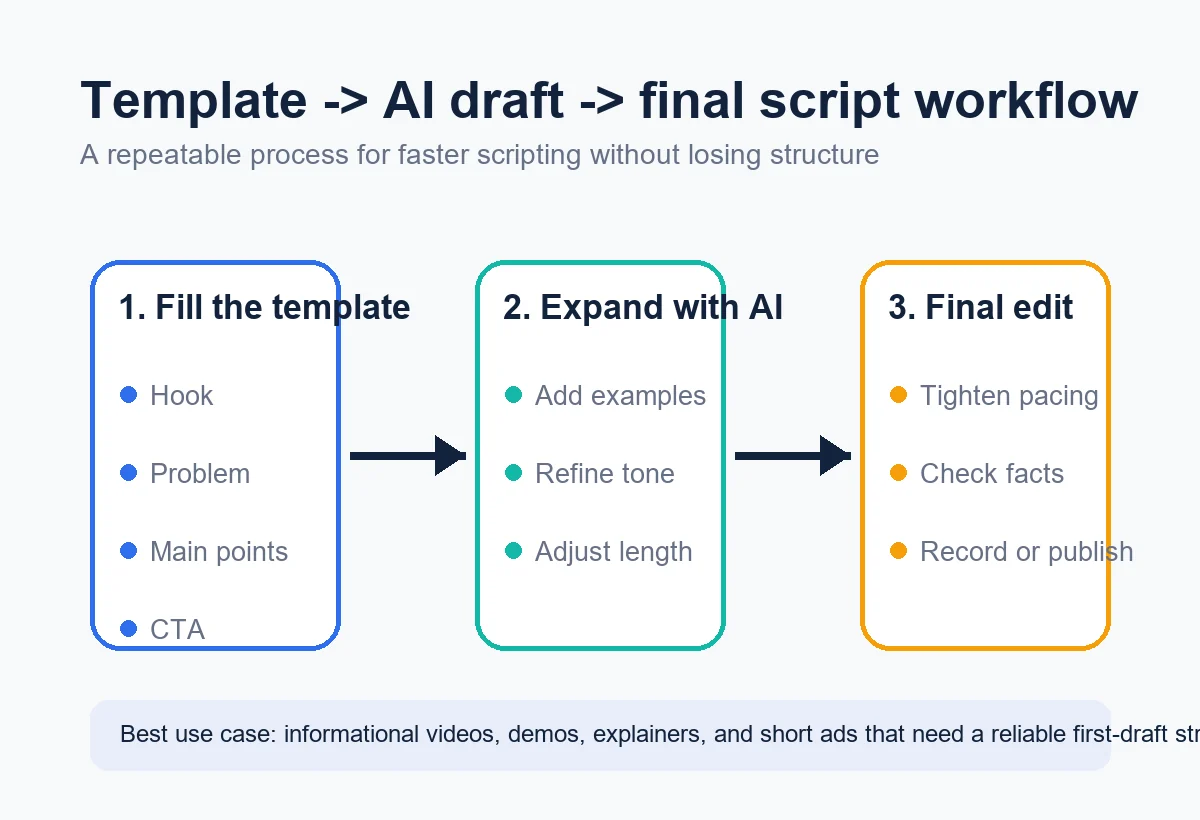
A fair way to test an AI script writer
Use one short, realistic brief in each product. Keep the inputs constant so the differences you notice come from the workflow rather than from a better prompt in one tool.
- Name the viewer. Say who the video is for and what that person already knows.
- State one promise. Describe the useful result without adding a second topic or an unsupported guarantee.
- Choose a format. Specify a tutorial, review, explainer, or Short and give an approximate duration.
- List the evidence. Provide your examples, product facts, or sources. Ask the model to mark any missing fact rather than inventing one.
- Set voice and visuals. Describe the delivery and ask for a few visual beats that add information instead of repeating narration.
- Review the same parts. Compare the opening, section order, factual boundaries, spoken rhythm, and amount of editing required.
Example test brief
Write a five-minute YouTube tutorial for first-time home coffee brewers who want to improve one cup without buying new equipment. Start with the common mistake of changing several variables at once. Use three steps, include a simple example for each, keep the tone practical, and mark any coffee science claim that needs a source. Add two visual beats and end with one relevant next step.
What to edit before recording
Treat the output as a draft even when a tool describes it as ready to film. Read it out loud, confirm each factual claim, and make the viewer's experience concrete.
- The opening earns attention. It gives a specific reason to keep watching without teasing a result the video will not deliver.
- Every section moves the promise forward. Remove points that repeat the introduction or do not help the target viewer make progress.
- Examples are real and relevant. Replace invented cases with your experience, a cited source, or a clearly labeled hypothetical.
- The words sound natural aloud. Shorten sentences that feel written for a page rather than spoken to a camera.
- The ending asks for one next step. Choose a call to action that follows from the video instead of stacking unrelated requests.
vidIQ AI Script Generator FAQ
Choose the workflow that removes the right friction
The vidIQ AI Script Generator is most relevant when YouTube writing belongs beside the product's other creator tasks. The public description gives you a clear set of things to test: hooks, pacing, outline structure, talking points, and revision controls. It does not establish that an output will fit your channel or improve performance without your review.
If your problem is simply getting from a topic to a recordable draft, compare a focused no-sign-up writer with vidIQ using the same brief. Keep the tool that gives you a useful structure, preserves your evidence, and leaves the least cleanup. Then make the final script yours.
Related script-writing guides
Product source
- Official feature page checked on November 7, 2026 for vidIQ's public description and signup call to action. vidIQ AI Script Writer
Last updated: November 7, 2026